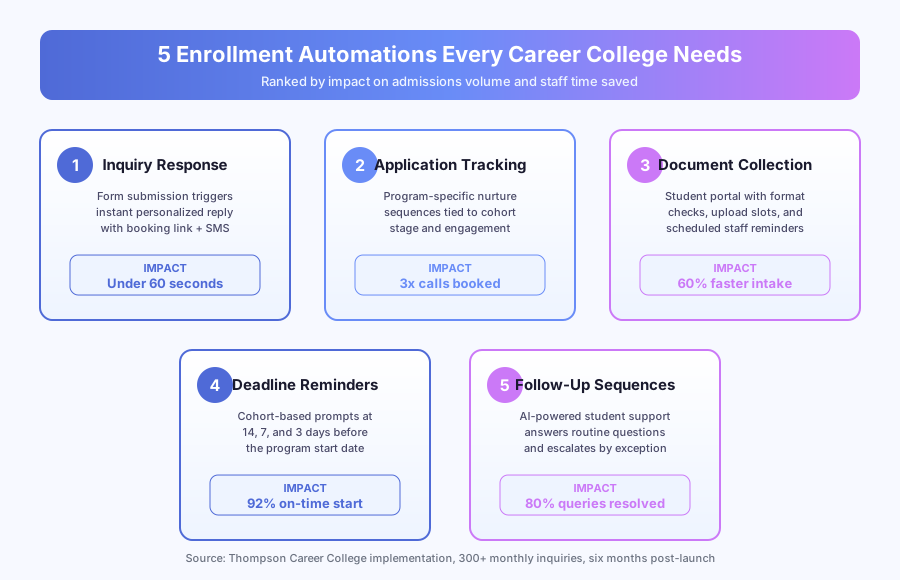
A prospective student fills out an inquiry form for a Medical Office Administration program at 9:47 PM on a Wednesday. She’s also filling out forms at Fanshawe College, Conestoga College, and two other private career colleges in Ontario. Whoever calls her first wins. Per a Harvard Business Review study (Oldroyd 2011, updated by Drift 2023), responding within 5 minutes makes you 100x more likely to connect with a lead. Thompson Career College (TCC) in London, Ontario automated 5 workflows and tripled admissions calls while resolving 80% of student queries without staff. Most career colleges respond in 1-2 business days. By then, she’s already enrolled somewhere else.
Why does speed to lead matter so much for career colleges?
Career colleges compete on response time. Monthly cohort starts create recurring deadlines, and missing a student for October usually means losing them for good. The school that replies first almost always wins the call, the tour, and the enrollment.
Career colleges face a competitive pressure universities don’t. Monthly cohorts mean there’s always a deadline bearing down. Miss a student for the October start and they either enroll at a competitor or vanish entirely.
Per McKinsey’s 2024 Global Survey on AI and Automation, 60% of occupations have at least 30% of tasks that could be automated. For admissions teams, the highest-impact automatable work is exactly what determines enrollment: inquiry reply, follow-up, and document intake.
Thompson Career College receives 300+ inquiries per month across its career programs. Before automation, admissions staff manually triaged each inquiry, drafted replies, and scheduled calls. Response time ran 1-2 business days, putting TCC behind every competitor who replied faster, including Fanshawe College and Western Continuing Studies.
How fast does a career college need to reply?
Under 5 minutes. Per Harvard Business Review (Oldroyd 2011, updated by Drift 2023), leads contacted within 5 minutes are 100x more likely to convert than leads contacted after 30 minutes. Under 60 seconds, as TCC now hits, is even better because it beats every competing college’s manual process.
The gap between 5 minutes and 1 business day is where career colleges lose most of their enrollment pipeline. A student filling out forms at 10 PM on a Tuesday expects something back by Wednesday morning. If she gets a reply from Conestoga College first and a reply from your school second, she’s already on a call with Conestoga before your email lands.
Automation 1: How do you reply to student inquiries in under 60 seconds?
TCC’s inquiry response workflow fires within seconds of a form submission. It sends a personalized email plus an SMS confirmation with the next cohort date, program details, and a direct booking link for an admissions call. Admissions staff only get pulled in if the student needs human help.
Here’s how the workflow runs:
- Student submits inquiry form (website, Google Ads landing page, or Meta Lead Ad)
- System identifies program of interest from form fields
- Qualification check runs (prerequisites, intake availability)
- Personalized email fires within seconds with program name, next start date, campus info
- SMS confirmation sends at the same time for mobile inquiries
- Booking link routes to Calendly or HubSpot Meetings
- CRM record created in HubSpot with the full inquiry payload
- Admissions team pinged via Slack only if human input is needed
The tool stack: HubSpot for CRM and email delivery, Calendly for booking, and n8n as the engine connecting form submissions to the reply workflow.
Per Forrester Research 2024 Total Economic Impact methodology, speed-to-lead automation delivers 200% ROI within 18 months for organizations with high inquiry volumes. TCC hit positive ROI in under six months because the automation didn’t just reply faster. It replied better, with program-specific detail that manual responses often missed during busy cycles.
Automation 2: How do program-specific nurture sequences work?
Not every inquiry converts on the first touch. Nurture sequences keep your school top-of-mind through program-specific emails timed to cohort deadlines. Each sequence adapts based on student behavior, pausing if a call is booked and flagging engaged non-converters for personal outreach.
TCC built sequences in Mailchimp that trigger from inquiry form data. A Personal Support Worker (PSW) inquiry gets a different sequence than Business Administration. Each sequence includes five emails:
| Timing | Content | |
|---|---|---|
| 1 | Day 0 | Program overview, next cohort date, booking link |
| 2 | Day 3 | Student success story from that program |
| 3 | Day 7 | Financial aid and OSAP information |
| 4 | Day 14 | Cohort deadline reminder with urgency |
| 5 | Day 21 | Final follow-up with direct admissions contact |
The sequence adapts. If a student books a call after Email 2, the rest of the nurture stops and a pre-call prep email sends instead. If a student opens every email but doesn’t book, the system flags them for a personal phone call.
Per IDC 2023 Future of Work research, employees spend 30% of their time on manual data entry and transfer tasks. Before automation, TCC’s admissions team was manually sending follow-ups and tracking who received what. Now the system handles the glue. Staff focus on the students who actually pick up the phone.
Automation 3: How do you automate enrollment document collection?
Document collection runs through a student portal with per-document upload slots, format validation, and scheduled reminders. When a student confirms enrollment, they get a link to a checklist customized to their program. The portal tracks completion and fires reminder emails plus SMS messages on day 3, 7, and 14.
Before automation, a single enrollment could take 2-3 weeks of back-and-forth on paperwork. For health programs, the checklist runs 10-15 documents: government ID, proof of education, OSAP documentation, medical clearances, police checks, and program-specific prerequisites.
The automated reminder schedule:
| Reminder | Timing | Channel |
|---|---|---|
| Welcome and checklist overview | Immediately | |
| Gentle nudge for missing items | Day 3 | |
| Firmer reminder with deadline | Day 7 | Email + SMS |
| Escalation to admissions staff | Day 10 | Staff notification |
| Final deadline warning | Day 14 | Email + SMS + call flag |
TCC cut document collection time by 60% with this system. Students appreciated the clarity (“I can see exactly what’s missing”) and staff stopped spending hours on “did you get my transcript?” email chains.
Tools: Clustdoc or Moodle’s assignment module for uploads, HubSpot for reminder sequencing, and n8n for workflow triggers. For a full walkthrough of intake automation, see how to automate client intake.
Automation 4: How do cohort deadline reminders prevent enrollment drop-off?
Cohort reminders catch students who intended to enroll but procrastinated. The system tracks each prospect’s target cohort and sends scheduled prompts at 14, 7, and 3 days before the start date. Each reminder includes a direct enrollment portal link, contact number, and program-specific details.
Here’s what every career college admissions director has seen. A student expresses interest, books a call, gets excited about a program, and then nothing. Life happens. The deadline passes. The student either enrolls next month (if you’re lucky) or disappears.
TCC’s reminder cadence:
- 14 days before start: “The October PSW cohort starts in two weeks. Here’s how to finalize your enrollment.”
- 7 days before: “Only 7 days until October start. Have you submitted your documents?”
- 3 days before: “Last chance to join the October cohort. Next available start: November.”
- Day of deadline: “October enrollment is closed. We’ve reserved a spot for you in November.”
Each reminder adapts to enrollment status. Already enrolled with documents submitted? They get a “you’re all set, see you Monday” confirmation instead.
Per Forrester Research 2024 Total Economic Impact studies, deadline-based nurture sequences raise conversion rates by 25-35% in education enrollment. TCC saw a similar lift. Deadline compliance moved from 70% to 92% within six months.
Automation 5: How does AI-powered student support reduce staff workload?
AI student support handles 80% of routine questions at TCC through a chat widget connected to a Moodle-based knowledge base. Students get answers to schedule, policy, and OSAP questions in under 30 seconds. Complex cases (academic appeals, financial hardship, transfer credit) route to advisors by exception.
Enrolled students have questions. Class schedules, exam dates, campus parking, OSAP disbursement timelines, transfer policies, graduation requirements. Before automation, every question went to the same admissions inbox as prospective inquiries.
What the system handles automatically:
- Class schedule lookups (“When does my Monday PSW class start?”)
- Deadline dates (“When is the last day to drop a course?”)
- Policy questions (“What’s the attendance requirement?”)
- Campus information (“Where do I park?” “What’s the WiFi password?”)
- OSAP status (“When does my next disbursement come?”)
What routes to staff:
- Grade disputes and academic appeals
- Financial hardship situations
- Personal circumstances requiring advisor judgment
- Complex transfer credit evaluations
- Complaints and escalations
Per McKinsey 2024 Global Survey, organizations using AI-powered self-service see 40-60% reduction in routine support volume. TCC’s 80% resolution rate exceeds that benchmark because career college questions are highly pattern-based.
What does the full tech stack look like?
A mid-sized career college running 300+ monthly inquiries typically needs 6-7 tools wired together through an automation engine. TCC’s stack costs $400-$900 per month total and runs without enterprise licensing. Tool choice matters less than the connections between them.
| Layer | Tool | Purpose |
|---|---|---|
| CRM and lead management | HubSpot | Inquiry tracking, pipeline stages, contact records |
| Email automation | Mailchimp | Nurture sequences, deadline reminders, enrollment comms |
| Appointment booking | Calendly | Admissions call scheduling with prep emails |
| Document collection | Clustdoc | Student-facing portal for enrollment paperwork |
| Learning management | Moodle | Student portal, knowledge base, course delivery |
| Automation engine | n8n | Connects all tools, manages workflows and triggers |
Larger institutions might substitute Slate by Technolutions for HubSpot, Salesforce Education Cloud for the CRM layer, Canvas for Moodle, or ActiveCampaign for Mailchimp.
The full Thompson Career College case study details the implementation timeline and ROI breakdown, and our Thompson Career College admissions deep-dive explains the speed-to-lead pipeline architecture and how a 4-week rollout cut inquiry response time from 1-2 business days to under 60 seconds. For a broader view of how automation supports sales pipelines (which is what admissions actually is), see our sales automation solutions.
What results can career colleges realistically expect?
TCC’s results after six months of running all five automations:
| Metric | Before | After |
|---|---|---|
| Inquiry response time | 1-2 business days | Under 60 seconds |
| Admissions calls booked per month | ~35 | ~105 (3x) |
| Student queries resolved without staff | ~10% | 80% |
| Document collection time | 2-3 weeks | Under 1 week |
| Enrollment deadline compliance | ~70% | ~92% |
Speed-to-lead automation showed results in the first week. Nurture sequences took about a month to generate measurable lift. Document collection and student support improvements were visible within 60 days.
The biggest shift wasn’t in any single metric. It was in how the admissions team spent their time. Before automation, 60-70% of their day was operational: data entry, email drafting, document chasing, answering routine questions. After automation, that time moved to high-value work: admissions calls, campus tours, student relationships, and program development.
Per McKinsey 2024, organizations that automate operational workflows see 20-30% productivity gains in the first year. For career colleges on tight margins with monthly enrollment targets, that gain translates directly to tuition revenue. More calls booked means more students enrolled. More students enrolled means more tuition. It’s that direct.
How long does enrollment automation take to implement?
Implementation runs 4-8 weeks for a mid-sized career college. Week 1-2 covers CRM setup and form integration. Week 3-4 builds the email and SMS sequences. Week 5-6 deploys the document portal and reminder workflows. Week 7-8 launches AI student support and runs live testing with admissions staff.
TCC ran a phased rollout. The inquiry reply workflow went live first because it generated the most immediate impact. Nurture sequences followed, then document collection, then cohort reminders, then AI student support. Each phase was tested with one program before expanding across all cohorts.
The five automations aren’t expensive or complex. They use tools that already exist, connected in ways that eliminate the manual glue between them. The student filling out a form at 9:47 PM on a Wednesday doesn’t know or care about your tech stack. She cares about one thing: who calls her back first.
Make sure it’s you. Book a discovery call to map your enrollment automation in 30 minutes.