“Where is my order?” That one question drives 33% of all e-commerce support tickets, according to Gorgias’s 2024 Ecommerce Customer Service Benchmark. It’s the same sentence, typed by hundreds of different people each week. And your team answers it manually, every time, burning hours that could go toward product launches or winning back churned customers.
For Shopify and WooCommerce brands running with 2-5 person teams, support volume scales lockstep with sales. More orders means more WISMO tickets, more returns, more “I think my package is lost.” At some point you’re choosing between hiring a support rep or letting response times slip past 24 hours. Automation gives you a third path: resolve 65% of tickets without a human touching them.
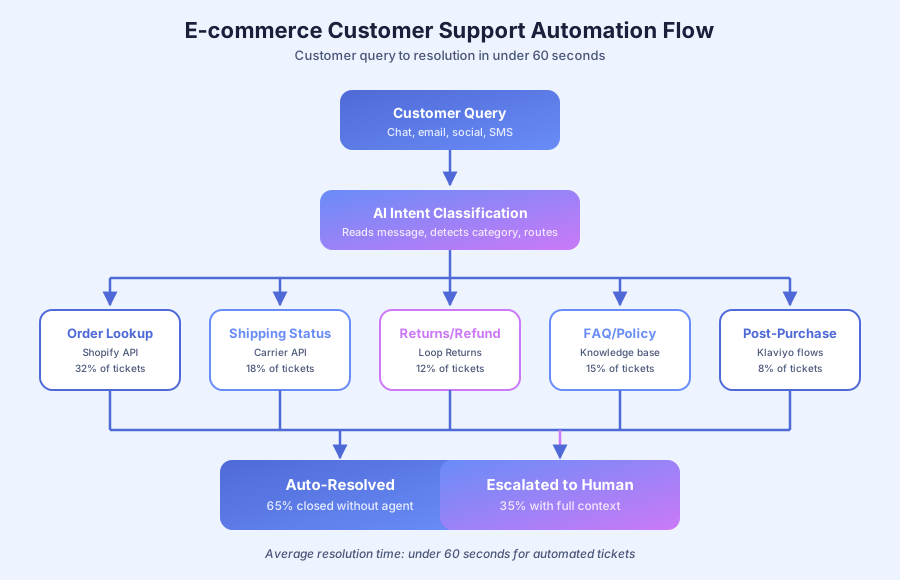
What percentage of e-commerce tickets can actually be automated?
Roughly 60-70% of e-commerce support tickets follow predictable patterns automation handles cleanly. That includes order status checks, shipping questions, FAQ responses, return requests, and post-purchase follow-ups. The remaining 30-40% need human judgment: damaged goods, custom requests, refund disputes, and VIP escalations where the brand voice matters.
Gorgias’s 2024 Ecommerce Customer Service Benchmark reports that 33% of all tickets are WISMO questions, with another 18% covering shipping and delivery issues. That’s over half the inbox solvable by a lookup. Add FAQ automation (15% of volume) and returns (12%) and you’re at 78% of tickets before touching the hard cases.
We built a support automation system for KwikUI, a SaaS platform with 3,000+ users and just 2 founders. After launch, 65% of tickets resolved without human involvement. Trial-to-paid conversion doubled from 4% to 8%, and churn dropped 40%. The same mechanics work for product brands because the ticket distribution looks almost identical.
Why now is the right time to automate
Zendesk’s 2024 CX Trends report found 70% of customers now expect companies to offer self-service, and 67% say they’d rather solve problems themselves than talk to an agent. The expectation has flipped. Five years ago, automation felt cold. Today, customers are annoyed when they can’t get an instant answer at 2am.
Meanwhile, Shopify’s 2024 Commerce Trends report shows small merchants are processing 29% more orders per full-time employee than they did in 2022, largely thanks to AI and automation. The productivity gap between automated and manual shops is widening fast, and customers reward the faster brands with repeat purchases.
What does bad e-commerce automation look like?
Bad automation feels worse than no automation. It sends generic “we got your message” replies, loops customers through dead-end menus, and escalates to humans without any context. Customers leave angrier than they arrived. Good automation, by contrast, is invisible: the customer gets a specific answer fast and never knows (or cares) whether a human or bot replied.
Three red flags to watch for when auditing your current setup:
- Canned responses that do not match the question. “Thanks for reaching out, here are our shipping policies” when the customer asked about a damaged product is worse than silence
- Agent handoffs without context. If your agent has to ask “what is your order number?” after the bot already collected it, your handoff is broken
- Escalation loops. When the bot cannot answer and routes to a human who routes back to the bot, customers churn
According to Salesforce’s 2024 State of the Connected Customer report, 76% of customers say the experience a company provides is as important as its products or services. Getting the automation right is a product decision, not just a cost decision.
How does automated order status tracking work?
Automated order tracking connects your helpdesk to your e-commerce platform and shipping carriers. When a customer asks where their order is, the system pulls the order by email, checks the carrier status, and sends back a specific ETA, all in under 10 seconds. No agent touches it, and the customer gets an answer faster than they could find it manually.
Here’s the flow most Shopify brands set up first:
| Customer Action | Automated Response |
|---|---|
| ”Where is my order?” | System matches email to order, pulls tracking, replies with status and ETA |
| Order ships | Triggered email with tracking number and estimated delivery |
| Package delayed | Proactive alert with updated timeline and apology |
| Package delivered | Confirmation email plus short satisfaction check |
| ”I never received my package” | Checks carrier status. If delivered, requests photo. If lost, starts replacement workflow. |
According to Statista’s 2024 e-commerce delivery report, 84% of online shoppers will not return to a brand after a single bad delivery experience. Proactive status updates prevent the “ghost package” panic that drives one-star reviews.
Tools worth the money
Gorgias (starts at $10/month with Shopify integration) includes order-lookup macros out of the box. AfterShip ($11/month) tracks across 1,100+ carriers worldwide. For chat-based resolution, Intercom or Tidio both connect to Shopify in under 30 minutes.
What does automated return processing look like?
Automated returns walk the customer through eligibility checks, generate a prepaid label, update inventory, and trigger the refund, all without agent involvement. The system applies your return policy rules automatically. Edge cases like damaged items or out-of-window requests route to staff with the full context preloaded, so the agent opens the ticket and immediately knows what happened.
The National Retail Federation’s 2024 Consumer Returns report puts the average e-commerce return rate at 16.9%. On a $500,000 revenue brand, that’s roughly $84,500 in returned merchandise, and manual return processing runs $5-15 per case in labor alone. Automation cuts that cost by 70-80%.
A clean automated return flow looks like this:
- Customer initiates return via a self-service portal or chat widget
- System checks eligibility against return window, product category, and final-sale rules
- If eligible, generates a prepaid label and sends shipping instructions
- Warehouse scans package on arrival, triggering the refund or exchange
- Customer gets notified when the refund posts or the exchange ships
- If ineligible, sends a polite policy explanation with an option to escalate
Tools: Loop Returns ($29/month, Shopify-native) is the most popular self-serve option. Returnly (now part of Affirm) and custom n8n workflows connecting the Shopify Admin API to Stripe refunds also work for brands with tighter budgets.
How do you automate FAQ responses without sounding robotic?
Modern FAQ automation uses AI trained on your specific product catalog, shipping policies, and past support conversations. It’s nothing like the clunky menu bots of 2015. The model understands different phrasings of the same question and pulls the right answer in your brand voice, not a generic chatbot voice.
The trick is training data. Feed the AI 100+ resolved tickets with your team’s actual responses. It learns your tone, your policies, and your edge cases from real examples. Salesforce’s 2024 State of Service report found 84% of service agents say AI tools help them give faster, more personalized responses, which is exactly what customers rate highest.
FAQs that automate well
| Question Category | % of Volume | Automation Approach |
|---|---|---|
| ”When will my order arrive?“ | 30-40% | Shopify + carrier tracking API |
| ”What’s your return policy?“ | 10-15% | Knowledge base lookup |
| ”Do you ship to [country]?“ | 5-10% | Shipping zone rules |
| ”What size should I get?“ | 5-10% | Size guide with measurement prompts |
| ”Can I change/cancel my order?“ | 5-8% | Order status check, rules engine |
| ”Where’s my refund?“ | 3-5% | Return status + processing timeline |
Tools: Gorgias (best for Shopify, built-in macros and AI), Tidio ($29/month, chat plus AI), Intercom (more powerful, higher cost), or a custom AI chatbot built on OpenAI or Anthropic Claude APIs for brands that want full control.
What post-purchase automation drives repeat business?
Post-purchase automation turns one-time buyers into repeat customers with the right message at the right time, triggered by purchase behavior and product-specific timing. It is not a generic newsletter. A customer who buys a consumable gets a replenishment nudge. A customer who bought a first-time item gets a how-to guide. Different sequences for different products.
According to Adobe’s 2024 Digital Economy Index, repeat e-commerce customers drive 40% of revenue from only 8% of visitors. A second purchase is worth 3-5x more than winning a new customer, which is why post-purchase flows have the highest lifetime ROI of any automation.
A proven sequence
- Order confirmation (immediate): thank you, order details, what to expect next
- Shipping notification (on dispatch): tracking link and delivery window
- Delivery follow-up (2 days after delivery): “How’s your [product]?” plus usage tips
- Review request (7 days): direct link to Google or product page review form
- Cross-sell (14-21 days): complementary products based on purchase history
- Replenishment (product-specific): “Time to reorder your [consumable]?”
- Win-back (90 days inactive): targeted offer to bring them back
Klaviyo handles all of this natively for Shopify stores, starting at $20/month for 500 contacts. Flows trigger on purchase events and segment by product, order value, and lifetime value.
What tools do small e-commerce teams need?
The right stack depends on your platform, ticket volume, and whether you want basic automation or full AI-powered support. Most sub-$1M brands land on the mid-range options and grow into premium tools as revenue scales past $2M.
| Tool Category | Budget | Mid-Range | Premium |
|---|---|---|---|
| Helpdesk | Tidio ($29/mo) | Gorgias ($10-60/mo) | Zendesk ($55/mo) |
| Chat/AI | Tidio AI | Intercom Fin | Custom AI (OpenAI/Claude) |
| Returns | Policy page | Loop Returns ($29/mo) | Returnly/Narvar |
| Email automation | Mailchimp ($13/mo) | Klaviyo ($20/mo) | Attentive ($500+/mo) |
| Tracking | Free Shopify | AfterShip ($11/mo) | Route (customer-paid) |
For a Shopify store under $1M in annual revenue, the recommended starter stack is Gorgias, Klaviyo, and AfterShip. Total cost: under $100/month. That combination handles 60-70% of support volume automatically and pays for itself in saved agent hours within the first 30 days.
When to build custom vs. buy off-the-shelf
Off-the-shelf tools work for 90% of small e-commerce brands. Build custom only when you have a specific workflow that no vendor supports cleanly, such as a complex bundled-subscription model, a multi-warehouse fulfillment setup, or a wholesale portal with per-account pricing rules. For everything else, the off-the-shelf stack is faster, cheaper, and better tested.
McKinsey’s 2024 State of AI report found that companies using pre-built AI tools reach production 3x faster than those building from scratch, with 40% lower total cost of ownership over three years. Start with Gorgias and Klaviyo, measure what they cannot handle, and only then consider custom work for the gaps.
How do you measure if your automation is working?
Track four metrics weekly: first-response time, resolution time, containment rate, and customer satisfaction score. First-response time should drop below 60 seconds for automated tickets. Resolution time should drop 40-60% overall. Containment rate (tickets closed without human touch) should hit 60-70%. CSAT should stay flat or improve, never dip.
Gorgias and Zendesk both include these metrics in their native reporting dashboards. If CSAT drops after launching automation, the most common cause is bad handoff logic, not the automation itself. Customers tolerate bots that answer accurately, but they lose patience when escalations lose context and force them to repeat themselves to a human agent.
How do you get started?
Start with your highest-volume ticket type, which for most brands is “where is my order?” Connect your helpdesk to Shopify so the system auto-replies with tracking. That single automation eliminates 30-40% of tickets in the first week. Measure the drop before adding anything else, so you know exactly what each layer contributes.
Next, add FAQ automation with a knowledge base trained on your past tickets. Then post-purchase flows in Klaviyo. Then returns with Loop. Each layer removes another chunk of manual work without disrupting what’s already working.
For a worked example with metrics, read our e-commerce brand support automation case study. If your support volume has outgrown your team and you need a custom system connecting your specific tools, book a free audit. We’ll map your support workflow, spot where tickets pile up, and build a system that handles the repetitive volume so your team focuses on cases that actually need them. Written report in 48 hours.
Learn more about customer service automation.