
According to IDC’s 2023 Future of Work study, employees spend 30% of their work time on manual data tasks. For a team of 5, that’s 1.5 full-time equivalents locked up in work that follows the same steps every single time. McKinsey’s 2024 Global Survey on AI adds that 60% of occupations have at least 30% of tasks that could be automated with existing technology. This guide is a reference list. Bookmark it. Come back when you’re planning your next project. Every process below includes what the manual version looks like, what the automated version does, and roughly how much time it saves per week.
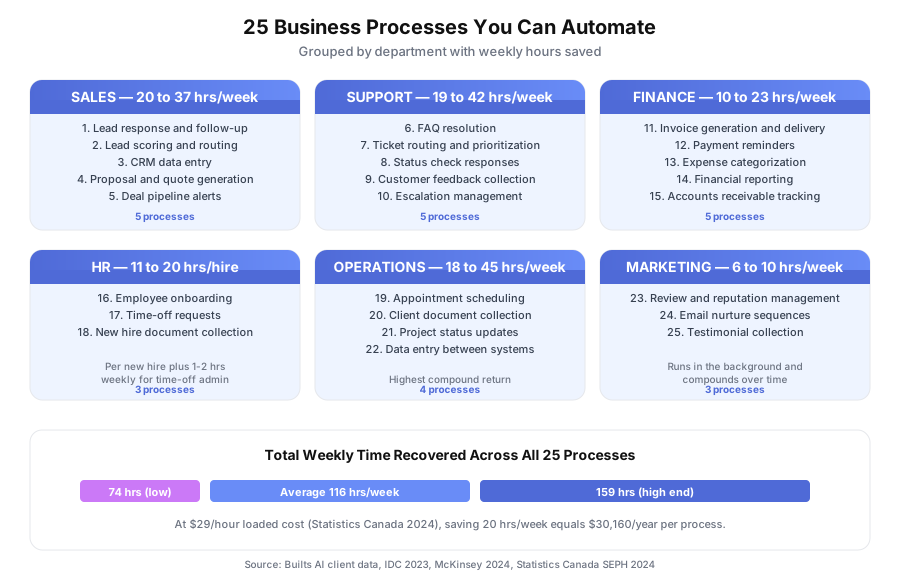
We’ve organized it by department: Sales (5), Support (5), Finance (5), HR (3), Operations (4), and Marketing (3).
Which Business Processes Can You Automate Right Now?
You can automate any repetitive, rule-based process with a clear trigger, defined steps, and a measurable outcome. The 25 processes below cover sales, support, finance, HR, operations, and marketing. Together, they save 74 to 159 hours per week for a typical small business team.
The common thread across all 25 is simple: they follow the same pattern every time. If you can describe the steps in a checklist, you can probably automate them. According to Forrester’s 2024 Total Economic Impact reports, the average first-year ROI on business process automation hits 200%.
Not every process belongs at the top of your list. Start with the ones that happen most often and cost you the most when they slip. We’ll show you exactly how to pick at the end.
How Much Time Can You Save in Sales Automation?
Sales automation saves 20 to 37 hours per week across the 5 processes below. Most of that time sits in admin work that doesn’t close deals: follow-up scheduling, CRM updates, and pipeline management. The actual selling stays with humans, but the busywork around it moves to software.
Sales reps spend a surprising share of their day on tasks that aren’t selling. McKinsey’s 2024 Global Survey on AI confirmed 60% of occupations have 30%+ automatable tasks, and for sales roles, that automatable portion skews heavily toward data entry and follow-up coordination.
Thompson Career College automated lead response and tripled admissions calls. Their response time went from 1 to 2 business days to under 60 seconds, with 80% of student queries auto-resolved before a human got involved.
| # | Process | Manual version | Automated version | Time saved/week |
|---|---|---|---|---|
| 1 | Lead response and follow-up | Check for new form submissions, open HubSpot or Salesforce, draft personalized email, send, set follow-up reminder | New lead triggers instant personalized response (under 60 seconds), enters a nurture sequence in Mailchimp or ActiveCampaign, flags for a human when buying signals appear | 8 to 15 hrs |
| 2 | Lead scoring and routing | Salesperson reviews each lead’s info, guesses purchase likelihood, decides who handles it | Leads scored based on behavior (pages visited, emails opened, form data) in HubSpot or Salesforce, routed to the right rep automatically | 3 to 5 hrs |
| 3 | CRM data entry | After every call, rep opens CRM and logs notes, updates deal stage, sets next steps | Call summaries auto-populate via Gong or Fireflies.ai, deal stages update based on activity, next steps created from your playbook | 5 to 10 hrs |
| 4 | Proposal and quote generation | Copy client details into a Google Docs template, calculate pricing, format, get approval, send | Client details pull from CRM, pricing calculates from rules in PandaDoc or Proposify, document generates and sends after approval | 2 to 4 hrs |
| 5 | Deal pipeline alerts | Manager reviews pipeline weekly, finds stalled deals manually, pings reps via Slack | Deals stalled 3+ days trigger alerts, manager gets weekly at-risk summary, reps get nudges before deals go cold | 2 to 3 hrs |
Learn more about sales automation.
How Much Time Can You Save in Customer Support?
Support automation saves 19 to 42 hours per week. It delivers the fastest visible ROI of any department because most tickets are repeat questions with known answers. Speed of response directly correlates with satisfaction and retention, so automation protects revenue too, not just time.
A Harvard Business Review study (Oldroyd, 2011, updated by Drift in 2023) found that response speed within 5 minutes of a form submission is 21 times more effective than a 30-minute response. Support queues that run on automation hit that window by default.
KwikUI automated 65% of support tickets for their 3,000+ SaaS users. Trial-to-paid conversion doubled from 4% to 8%. Churn dropped 40%. The pattern repeats across our clients: when the easy questions get answered instantly, the hard ones get better attention.
| # | Process | Manual version | Automated version | Time saved/week |
|---|---|---|---|---|
| 6 | FAQ resolution | Customer emails a question, support rep reads it, searches the knowledge base, types a response | AI recognizes the question, pulls the answer from your knowledge base, responds instantly via Intercom, Zendesk, or a custom chat widget | 10 to 20 hrs |
| 7 | Ticket routing and prioritization | Someone reads every incoming ticket in Zendesk or Freshdesk, decides who handles it, assigns manually | Tickets categorized by topic and urgency automatically, routed to the right agent with full context, VIP customers flagged | 3 to 5 hrs |
| 8 | Status check responses | Customer calls or emails asking “what’s the status?” Someone looks it up and responds | System checks status in your database and responds instantly, or directs the customer to a self-service portal | 5 to 15 hrs |
| 9 | Customer feedback collection | After a project or purchase, someone remembers to request feedback (often forgotten) | Feedback requests trigger automatically after milestones via Typeform, responses route to the right team in Slack | 1 to 2 hrs |
| 10 | Escalation management | Frustrated customer sends multiple messages, nobody notices until it’s a crisis | Negative sentiment or repeated contacts trigger an escalation alert in Slack or PagerDuty, the right manager gets notified | Prevents revenue loss |
Skylarks International eliminated 80% of status update calls with an automated client portal. Their 15-person team now spends time on actual immigration casework instead of answering “any update on my file?”
Learn more about customer service automation.
How Much Time Can You Save in Finance Automation?
Finance automation saves 10 to 23 hours per week, plus an additional 4 to 10 hours per month on reporting. Finance processes are ideal automation candidates because they’re rule-based, time-sensitive, and expensive when humans make mistakes.
Gartner’s 2023 Data Quality Market Survey found poor data quality costs organizations an average of $12.9 million per year. For small businesses, even modest error reduction in invoicing and reconciliation translates to thousands saved annually. Automation doesn’t just save time here, it protects cash flow.
If you want step-by-step instructions, see our guide on how to automate invoicing and payment reminders.
| # | Process | Manual version | Automated version | Time saved/week |
|---|---|---|---|---|
| 11 | Invoice generation and delivery | Open QuickBooks or Xero, create invoice, enter line items, email via Gmail, repeat for every client every cycle | Invoices generate automatically from project data in Harvest or Toggl, send on schedule via Stripe, overdue reminders follow up automatically | 3 to 8 hrs |
| 12 | Payment reminders | Check who’s overdue in QuickBooks, draft a polite email, send, track responses, follow up again | Overdue invoices trigger a reminder sequence (gentle, firm, final) via Stripe or SendGrid, payment links included, escalation only when needed | 2 to 5 hrs |
| 13 | Expense categorization | Download bank transactions from RBC or TD, categorize manually in QuickBooks, cross-reference receipts | Transactions categorize automatically based on rules and past patterns using Dext or Hubdoc, exceptions flagged for review | 3 to 6 hrs |
| 14 | Financial reporting | Pull data from multiple sources, copy into Google Sheets, build charts, format, send to stakeholders | Reports compile from live data on schedule, stakeholders get them without spreadsheet work, dashboards update in real-time | 4 to 10 hrs/month |
| 15 | Accounts receivable tracking | Spreadsheet tracking who owes what, when it’s due, who’s been reminded, manually updated | Dashboard in QuickBooks or Xero shows real-time AR status, aging reports update automatically, follow-up actions trigger by days outstanding | 2 to 4 hrs |
Learn more about finance automation.
How Much Time Can You Save in HR and Onboarding Automation?
HR automation saves 11 to 20 hours per new hire, plus 1 to 2 hours per week on ongoing time-off admin. HR processes are repetitive by nature: every new hire follows the same onboarding sequence, every time-off request follows the same approval flow. The variability is low, which makes automation effective.
SHRM’s 2024 Human Capital Benchmarking Report pegs the average cost-per-hire at $4,129. A meaningful chunk of that number is manual admin work surrounding the hire itself, not the recruiting. Cut the admin and you cut the cost.
| # | Process | Manual version | Automated version | Time saved |
|---|---|---|---|---|
| 16 | Employee onboarding | New hire starts, someone emails a welcome packet, someone else creates accounts in Google Workspace and Slack, a third person assigns LMS training | Offer acceptance triggers a complete sequence: welcome email, account provisioning via BambooHR or Rippling, training assignments, manager notifications, day-one checklist | 8 to 15 hrs per hire |
| 17 | Time-off requests | Employee emails manager, manager checks calendar conflicts manually, approves via email, someone updates shared calendar | Employee submits through a BambooHR or Gusto portal, system checks conflicts, manager approves with one click, calendar and payroll update automatically | 1 to 2 hrs/week |
| 18 | Document collection from new hires | HR emails new hire for tax forms (TD1, SIN), ID copies, direct deposit info, follows up when forgotten, files everything in Google Drive manually | Portal sends document requests via DocuSign, reminders go out until complete, files organize into the right folder by employee name and type | 3 to 5 hrs per hire |
How Much Time Can You Save in Operations Automation?
Operations automation saves 18 to 45 hours per week, the widest range of any department. It also has the highest compound return, because operational bottlenecks affect every other team. When client document collection takes 3 weeks instead of 3 days, projects stall across the board.
Pixorr, a 5-person SEO agency, reclaimed a full work week per month by automating client reporting. Reports that used to pull from Google Analytics 4, Semrush, and Ahrefs now compile automatically. That’s 85% faster reporting and an operations manager who spends time on strategy instead of data entry.
| # | Process | Manual version | Automated version | Time saved/week |
|---|---|---|---|---|
| 19 | Appointment scheduling | Customer calls, front desk checks availability in Google Calendar, proposes times back and forth, confirms, sends reminders, calls no-shows | Self-service booking from your website via Calendly or Acuity, calendar syncs in real-time, confirmations via Twilio SMS, no-show follow-up triggers automatically | 5 to 15 hrs |
| 20 | Client document collection | Email clients asking for documents, wait, follow up, chase via phone, receive files in 6 formats across email and Dropbox, organize manually | Client portal with upload requests, automated reminders via SendGrid until complete, documents organized automatically by client and type | 5 to 10 hrs |
| 21 | Project status updates | Manager messages each team member in Slack asking for updates, compiles them into a Google Docs report, sends to stakeholders | Status pulls from Asana, Monday.com, or ClickUp automatically, stakeholders get weekly digests, blocked tasks surface without anyone asking | 3 to 5 hrs |
| 22 | Data entry between systems | Copy information from one tool and paste into another: CRM to QuickBooks, website to HubSpot, Shopify to inventory | Systems sync in real-time via Zapier, Make, n8n, or direct API integrations, data flows without a human in the middle | 5 to 15 hrs |
Skylarks International cut document collection time by 70% using an automated client portal. Their 15-person immigration consulting team handles 40%+ more cases at the same headcount.
Learn more about booking automation.
How Much Time Can You Save in Marketing Automation?
Marketing automation saves 6 to 10 hours per week. It isn’t just email blasts. It’s the operational glue between customer milestones and communication. The processes below run in the background and compound over time, so the savings grow as your list and client base grow.
Salesforce’s 2024 Small Business Trends Report found 43% of small business owners now rank automation as their top operational priority. Marketing teams that automate feedback loops and nurture sequences free up time for strategy and creative work that actually moves the needle.
| # | Process | Manual version | Automated version | Time saved/week |
|---|---|---|---|---|
| 23 | Review and reputation management | After a successful engagement, remember to ask for a Google or Yelp review, hope the client follows through, respond manually | Review requests trigger automatically after positive milestones via Birdeye or Twilio, negative feedback intercepted before going public, response templates speed replies | 2 to 3 hrs |
| 24 | Email nurture sequences | Segment your list manually in Mailchimp, write emails for each segment, schedule sends, track opens, adjust strategy | New contacts enter segment-specific sequences based on source, behavior, and profile data, triggers determine next email, reports show performance | 3 to 5 hrs |
| 25 | Social proof and testimonial collection | Ask happy clients for testimonials via email, follow up when they don’t respond, format responses, add to website manually | Satisfaction surveys via Typeform trigger automatically, high-scoring responses get a testimonial request, approved quotes populate via CMS integration | 1 to 2 hrs |
Learn more about review automation.
What’s the Total Time You Could Recover With Process Automation?
Adding up all 25 processes, a typical small business could recover 74 to 159 hours per week. The midpoint sits around 116 hours, which is the equivalent of roughly three full-time employees. No single business would automate all 25 at once, but even your top 3 typically save 15 to 40 hours weekly.
Here’s the full picture across departments:
| Department | Processes | Weekly time saved (range) |
|---|---|---|
| Sales | 5 processes | 20 to 37 hrs |
| Customer Support | 5 processes | 19 to 42 hrs |
| Finance | 5 processes | 10 to 23 hrs (plus monthly reporting) |
| HR and Onboarding | 3 processes | 1 to 2 hrs/week + 11 to 20 hrs per hire |
| Operations | 4 processes | 18 to 45 hrs |
| Marketing | 3 processes | 6 to 10 hrs |
Forrester’s 2024 Total Economic Impact studies put average first-year ROI on business process automation at 200%. At $29/hour loaded employee cost (Statistics Canada 2024 SEPH midpoint), saving 20 hours per week equals $30,160 per year in labor alone. That’s before you count recovered revenue, reduced errors, or the extra capacity your team gets back.
Where Should You Start With Business Process Automation?
Start with the one process that happens most often, has the clearest repeatable steps, and costs you the most when it fails. For most small businesses, that’s lead follow-up (#1), appointment scheduling (#19), or invoice reminders (#12). All three are high-frequency, time-sensitive, and directly affect revenue.
Don’t try to automate all 25 at once. It’s a common mistake that kills momentum and burns budget. Pick one, build it, measure the results for 30 days, then come back to this list for the next one.
Use this quick test on any process before you automate it:
- Does it happen every week? High frequency equals high savings.
- Can you describe the steps in a checklist? If yes, it’s rule-based enough to automate.
- Does it hurt when it fails or gets delayed? If yes, automation protects revenue, not just time.
UiPath’s 2024 Automation Index found organizations that progress from Level 1 (basic task automation) to Level 3 (intelligent process automation) see 4x higher adoption rates and dramatically better returns. The gap between companies that automate strategically and those that don’t is widening every year.
If you want help picking the right starting point for your specific business, book a free audit. We’ll map your operations in 30 minutes and show you exactly where to start. You’ll get a written report within 48 hours with estimated savings for each recommended process. Free, no obligation.