Small businesses using AI hiring tools fill open roles 40% faster than peers relying on manual review alone, according to LinkedIn’s 2025 Future of Recruiting Report. That’s not a marginal improvement — it’s the difference between an open seat costing you six weeks of lost productivity versus three. Hiring typically consumes 40-60 hours of founder or manager time per role when done manually, and most of that time goes to administrative work, not actual candidate evaluation. AI won’t make your judgment calls for you, but it can delete the paperwork around them.
This guide covers the three highest-ROI applications of AI in small business hiring, what AI can’t do, the risks you need to manage, and a practical setup you can build on tools you already own.
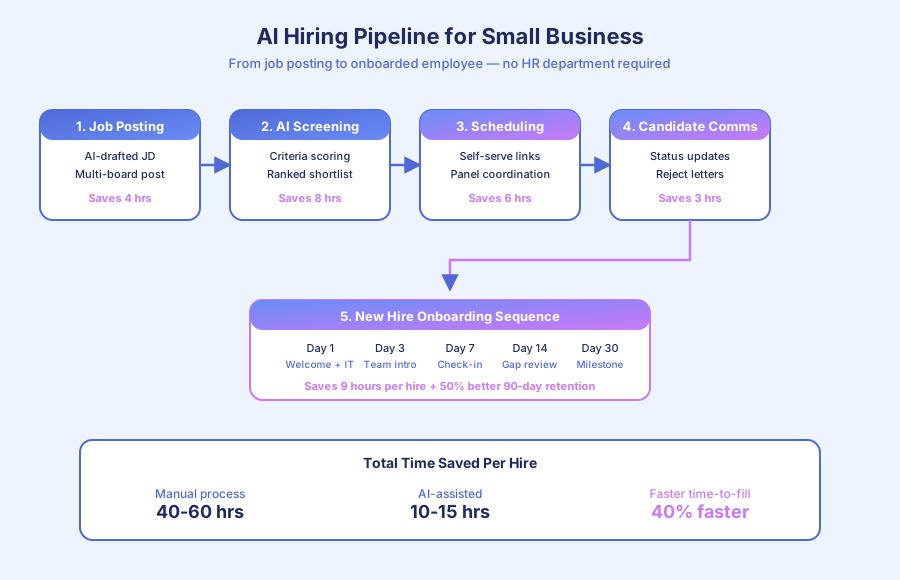
What are the highest-ROI AI applications for small business hiring?
Three applications deliver measurable time savings in 2026: automated candidate screening, self-serve interview scheduling, and structured onboarding sequences. Together they shave 25-45 hours off a single hire while improving time-to-fill by roughly 40%, per LinkedIn’s 2025 recruiting data. Each runs on affordable tools most small teams already use.
How much time does each stage actually save?
Here’s the breakdown based on a typical role receiving 40 applications and running through three interview rounds:
| Stage | Manual time | AI-assisted time | Savings |
|---|---|---|---|
| Job description drafting | 2-4 hours | 20-30 minutes | 2-3 hours |
| Application screening | 3-4 hours | 45-60 minutes | 2-3 hours |
| Interview scheduling | 4-6 hours | 10 minutes | 4-6 hours |
| Candidate communication | 2-3 hours | 15 minutes | 2-3 hours |
| New hire onboarding | 8-12 hours | 1-2 hours | 7-10 hours |
| Total per hire | 19-29 hours | 3-5 hours | 17-25 hours |
For founders running lean teams, that’s an entire workweek reclaimed per hire — without cutting corners on candidate quality or experience.
How does AI candidate screening work and when should you use it?
AI screening scores incoming applications against criteria you define, then presents a ranked shortlist instead of a raw inbox. It analyzes experience level, required skills, location, availability, and compensation alignment. Hiring managers review the top tier in about 45 minutes instead of 3-4 hours, cutting initial review time by 60-70%.
What criteria should AI screen for?
Stick to objective, job-relevant criteria that can be verified from a resume or application form:
- Required experience level — years in comparable roles, not “culture fit”
- Must-have skills or certifications — specific, verifiable qualifications
- Location and work authorization — remote, hybrid, or on-site requirements
- Availability and start date — when they can realistically begin
- Compensation range compatibility — avoids wasted interviews
Avoid letting AI score subjective dimensions. “Culture fit,” “communication style,” or “enthusiasm” aren’t things an algorithm assesses fairly from a resume, and using AI for them invites bias claims.
What does LinkedIn’s data actually show?
According to LinkedIn’s 2025 Future of Recruiting Report, small businesses using AI screening fill open positions 40% faster than those using manual review alone. The speed gain comes almost entirely from compressing the time between application close and first interviews — weeks turn into days because there’s no screening backlog to work through. Hire quality, measured by 180-day retention, stayed statistically flat in the same study.
What AI screening can’t catch
An unusually written cover letter that spots exactly the right non-obvious experience — the kind that makes a human reviewer stop and read twice — may not score highly on keyword-matching. Run a spot-check on AI-rejected candidates for roles with small applicant pools, especially when you’re hiring for skills that are hard to describe in a standard requirement list.
How does automated interview scheduling eliminate email back-and-forth?
Automated scheduling turns 3-5 days of calendar ping-pong into a single candidate click. The system sends a scheduling link showing the interviewer’s real-time availability, the candidate picks a slot, and both sides receive calendar invites with reminders — zero email required. For a role with eight first-round interviews, this alone saves 4-6 hours of coordination work.
The mechanics
The sequence is straightforward:
- Candidate advances to interview stage
- System sends a Calendly or HubSpot Meetings link showing available slots
- Candidate selects a time
- Calendar invites send automatically with video links
- Reminders fire 24 hours and 1 hour before
- Reschedules happen through the same link — no email thread
For multi-round interviews with multiple interviewers, platforms like Greenhouse or Lever coordinate panel availability automatically. Each interviewer syncs their calendar once, and the system finds overlapping slots across the panel without anyone emailing.
Tool choice by hiring volume
| Monthly hires | Recommended scheduling | Approximate cost |
|---|---|---|
| 1-2 per month | Calendly or Cal.com | $0-12 per user |
| 3-5 per month | HubSpot Meetings or SavvyCal | $15-20 per user |
| 5+ per month | Greenhouse, Lever, or Ashby | $6,500+ per year |
For most small businesses hiring fewer than 10 people annually, Calendly plus a shared inbox handles the entire workflow. No ATS required.
What does an automated onboarding sequence look like?
An automated onboarding sequence delivers the same information, access, and check-ins to every new hire on the same schedule, regardless of how busy their manager is that week. According to SHRM’s 2025 Onboarding Research, organizations with structured onboarding see 50% better 90-day retention than those with informal approaches. Consistency is the mechanism.
Day-by-day structure
Day 0 (before start): Welcome email with first-day logistics, IT credentials, first-day schedule, and what to bring. Equipment arrives at the candidate’s home or is ready at their desk.
Day 1 (end of day): Automated check-in from the hiring manager. What went well? Any blockers? Anything unclear?
Day 3: Team process introduction — key tools, communication norms, recurring meetings, documentation links.
Day 7: First-week reflection prompt for both new hire and manager. Structured questions avoid the “everything’s fine” check-in.
Day 14: Explicit gap review — “What information or access do you still need?” This catches the requests that new hires feel awkward asking for directly.
Day 30: Milestone acknowledgment with a forward look to the next 60 days. Discuss the first 90-day goals.
The manager’s role is reviewing responses and having substantive 1:1 conversations — not remembering to send each message. That’s where the retention improvement comes from: the conversations happen because the system makes them happen.
Why structured onboarding matters for small teams
Small businesses tend to have the worst onboarding experiences because managers are simultaneously wearing four other hats during a new hire’s first week. The Brandon Hall Group’s 2025 research found companies with structured onboarding improve new hire productivity by 70%. For a 10-person team hiring one role, that’s a measurable revenue difference within the first quarter.
What can’t AI do in the hiring process?
AI handles administrative work well but fails at the parts that actually require human judgment — assessing culture and working style fit, evaluating unstructured applications, and conducting interviews. The research on AI-driven video interview assessment is particularly weak, and regulators in multiple states are now restricting these tools.
Three things to keep human
Culture and working style fit. AI can check if a resume meets criteria. It can’t assess whether someone’s communication approach, values, and working rhythm will mesh with your team. That’s what interviews are for.
Unstructured application evaluation. Keyword-matching algorithms miss the candidate whose cover letter describes exactly the right experience in unusual terms. For small applicant pools, scan AI-rejected candidates manually.
The interview itself. Video interview AI claiming to assess personality from facial expressions and speech patterns lacks peer-reviewed evidence for accuracy, according to a 2024 study in the MIT Sloan Management Review. Illinois’s AI Video Interview Act and Maryland’s facial recognition law already restrict these tools. Keep interviews human-to-human.
The bias problem is real but manageable
AI trained on historical hiring data perpetuates historical bias. A 2024 Northwestern University study of resume screening AI found measurable racial and gender bias in tools sold to small and mid-market companies. Three mitigations work: choose vendors who publish bias audits, define screening criteria strictly from job requirements, and audit AI-rejected candidates monthly to catch pattern drift.
How do you build a small business AI hiring pipeline on tools you already own?
A complete AI hiring pipeline runs on Typeform, Make, GPT-4, Calendly, and email — tools most small businesses already pay for. Total additional cost is typically $50-150 per month. No dedicated HR software or applicant tracking system is required for teams under 50 employees.
The stack, stage by stage
Application → screening:
- Candidates apply via Typeform or Google Forms with structured questions — experience, availability, compensation, role-specific skills
- Make sends responses to GPT-4 for scoring against your criteria
- Scored applications land in a Google Sheet, Notion database, or your CRM with ranked shortlist
- Hiring manager reviews the top tier and advances candidates with a single click
Screening → interviews:
- Advanced candidates receive a Calendly link with interviewer availability
- Candidate self-schedules; calendar invites fire automatically
- Reminder messages send 24 hours and 1 hour before
- Rejection emails go to non-advancing candidates with a respectful template
Offer → onboarding:
- Offer accepted triggers a new hire record
- Onboarding sequence fires based on start date — Day 0 through Day 30
- IT provisioning tasks auto-create in ClickUp, Asana, or Notion
- Manager receives reminders for the substantive check-ins, not the template ones
What this looks like in practice
For a 15-person professional services firm hiring three roles per year, this setup reduced total hiring admin from roughly 130 hours annually to about 25 — a saving of 105 hours, or roughly two and a half workweeks reclaimed for the founder. Time-to-fill dropped from 42 days to 24 on average, tracked across six hires in 2025.
For related reading, see our case study on How an HR Automation System Cut Onboarding From 3 Weeks to 3 Days and our guide on How to Automate Customer Onboarding Welcome Sequences.
Ready to build your AI hiring pipeline?
Book a free automation audit and we’ll map your current hiring workflow, identify where the biggest time losses are, and design an AI-assisted process that fills positions faster without increasing the risk of a bad hire. Most small business hiring pipelines can be built in under two weeks on tools you already own.