Sixty-seven percent of after-hours service calls go unanswered at small home-service businesses, according to the 2024 Lead Connect industry report — and most of those leads never call back. The fix isn’t buying a generic CRM that promises to “manage your customers.” It’s installing a field service management (FSM) platform that handles dispatching, routing, invoicing, and service history all in one system.
Here’s the contrarian take: when an HVAC or plumbing contractor asks “what’s the best CRM for my business,” they’re asking the wrong question. Generic CRMs like HubSpot and Salesforce were built for B2B sales pipelines — not for dispatching three technicians across town, tracking which equipment was last serviced at 1247 Maple Street, or sending automated quote follow-ups while a tech is mid-job.
We’ve helped home-service businesses across HVAC, plumbing, electrical, and landscaping select and integrate operational software since 2022. Three FSM platforms consistently win: Jobber for shops under 10 trucks, Housecall Pro for mobile-first operations, and ServiceTitan for shops with 15+ technicians. The rest of this post explains why generic CRMs lose to purpose-built FSM, walks through the three picks with real pricing, and shows where AI customer service plugs into the stack.
Best CRM for Home Services: Quick Comparison
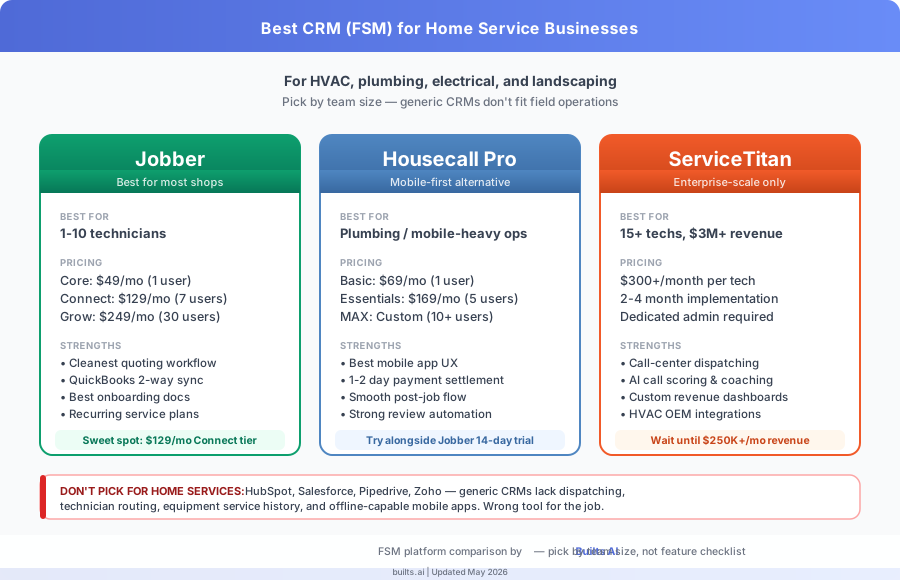
For shops under 10 technicians, Jobber wins on price and breadth ($49-249/month). For mobile-first operations with same-day payment needs, Housecall Pro is the alternative ($69-169/month). For 15+ technician operations needing call-center dispatch and revenue analytics, ServiceTitan is the only serious choice ($300+/month per tech). Generic CRMs like HubSpot and Salesforce are wrong-tool fits for field service operations.
| Platform | Best for | Starting price | Pick if |
|---|---|---|---|
| Jobber | 1-10 technicians | $49/mo (Core) | You want the broadest feature set at the lowest entry price |
| Housecall Pro | Mobile-heavy plumbing/HVAC | $69/mo (Basic) | Tech mobile UX and same-day payments matter most |
| ServiceTitan | 15+ technicians, $3M+ revenue | $300+/mo per tech | You need call-center routing, custom revenue dashboards |
| HubSpot / Salesforce | ❌ Wrong fit | N/A | You actually run a B2B sales pipeline, not field service |
If you’re a smaller shop weighing this against a generic CRM, our general best-CRM guide covers HubSpot, Pipedrive, Zoho, and Salesforce in detail — but for trades, the FSM picks below win every time.
Why Do Generic CRMs Fail Home Service Businesses?
Generic CRMs fail home service businesses because they were designed for B2B sales pipelines, not field operations. HubSpot tracks deals through stages like “demo scheduled” and “proposal sent.” A plumbing business needs to track jobs through stages like “dispatched,” “tech on-site,” “estimate signed,” and “invoice paid.” Those are fundamentally different workflows that a sales CRM can’t model without expensive customization.
Three operational gaps make generic CRMs unworkable for trades:
Dispatching. When a customer calls at 9am for a same-day repair, the dispatcher needs to see which technicians are available, where they currently are, and which has the right skill set. HubSpot has no concept of a technician calendar or a job board. Jobber, Housecall Pro, and ServiceTitan all show today’s jobs as a drag-and-drop board with technician assignments.
Service history tied to equipment. When a tech arrives at a recurring customer, they need to see what was installed, what was last serviced, and any equipment-specific notes. Generic CRMs track customer interactions but not equipment records at an address. FSM platforms attach service history to both the customer AND the physical equipment installed at their property.
Mobile job updates from the field. A technician finishing a job at 11am needs to clock out, attach photos, capture a signature, generate an invoice, and collect payment — all from their phone, often without strong reception. FSM mobile apps cache work offline and sync when reconnected. Generic CRM mobile apps assume an office worker on stable wifi.
The result: trades that try to force-fit a generic CRM end up bolting on 4-5 separate tools (separate scheduler, separate dispatch board, separate mobile app, separate invoicing). The tool sprawl costs more than a purpose-built FSM and creates data inconsistencies that hurt the customer experience.
What Is Jobber and Why Does It Win for Most Shops?
Jobber is the best FSM platform for most home service businesses with 1-10 technicians because it covers the full job lifecycle (lead → quote → schedule → dispatch → invoice → payment) in one system at the lowest entry price among credible options. According to Jobber’s 2024 Annual Pulse Report on home-service businesses, 76% of Jobber customers using its automated quote-follow-up feature increased close rates by 15% or more within 90 days.
Pricing as of Q2 2026:
| Tier | Price | Users | Best for |
|---|---|---|---|
| Core | $49/month | 1 | Solo operators |
| Connect | $129/month | Up to 7 | Small teams (online booking + automation) |
| Grow | $249/month | Up to 30 | Growing teams (SMS, quote follow-up, lead routing) |
What Jobber does well: clean quoting workflow with line items and optional add-ons; recurring service plans for HVAC maintenance contracts; QuickBooks Online two-way sync (so accounting stays clean); a tech mobile app that works offline; client portals where customers can approve quotes and pay invoices.
What Jobber does less well: voice/call routing (they integrate with third parties like CallRail), advanced reporting (basic at lower tiers, better on Grow), and inventory tracking (functional but not a strength).
The Connect tier at $129/month is the sweet spot for most 2-5 person shops. It unlocks online booking, automated appointment reminders, and team scheduling — features that meaningfully reduce no-shows and admin time. Jobber’s documentation and onboarding are the best in the FSM category, which matters when no one on your team is “the software person.”
What Makes Housecall Pro the Mobile-First Alternative?
Housecall Pro is the best FSM alternative to Jobber for mobile-heavy operations like plumbing or appliance repair where the technician spends 90% of their day on a phone. Its mobile app is widely considered the most polished in the category, and its built-in payment processing settles to your bank account in 1-2 business days versus Jobber’s standard payment processor terms.
Pricing as of Q2 2026:
| Tier | Price | Best for |
|---|---|---|
| Basic | $69/month | 1 user |
| Essentials | $169/month | Up to 5 users + automated review requests |
| MAX | Custom quote | 10+ users with advanced reporting |
Where Housecall Pro pulls ahead: instant credit card processing in the field with low transaction fees; the smoothest “post-job tasks” mobile flow (collect signature → upload photos → send invoice → take payment in under 90 seconds); strong online review request automation (Google + Yelp prompts).
Where Jobber pulls ahead: more granular quoting (price tiers, optional add-ons, package pricing); broader third-party integrations including Zapier and Make.com depth; better handling of recurring service plans for HVAC maintenance contracts.
Practical advice: most teams should run both 14-day free trials in parallel with one real job each. The deciding factor is usually which mobile UX your lead technician prefers — that’s the person who’ll use the app 8 hours a day.
When Does ServiceTitan Make Sense?
ServiceTitan starts making sense at 15+ technicians, $3M+ annual revenue, or operations running a dedicated call center for inbound service requests. Below that threshold, ServiceTitan’s $300+/month per-technician pricing and 2-4 month implementation timeline outweigh the benefits over Jobber or Housecall Pro. According to ServiceTitan’s published 2024 customer profile data, the average ServiceTitan customer has $5.2M in annual revenue and 22 field employees.
What ServiceTitan unlocks at scale: call-center grade dispatching with skill-based routing; call recording and AI-powered call scoring (used to coach CSRs); custom revenue dashboards by technician, service line, and lead source; deep integrations with HVAC manufacturer warranty databases (Carrier, Trane, Lennox).
What it costs operationally beyond the subscription: a dedicated admin to maintain configurations, build custom reports, and train new staff. Most successful ServiceTitan deployments have someone whose primary job is “running ServiceTitan.” For shops without that overhead capacity, the platform’s power becomes complexity that slows everyone down.
If you’re sub-15 technicians and considering ServiceTitan because a sales rep called you, our advice: stay on Jobber or Housecall Pro until you’re consistently breaking $250K/month in revenue. Migrate to ServiceTitan only when the dispatching volume, revenue analytics needs, and call-center workflows start hitting actual ceilings on your current platform.
How Does AI Customer Service Plug Into the FSM Stack?
The highest-leverage AI integration for home service businesses is after-hours and overflow call capture — the moment when an existing customer or new lead reaches out and there’s no one to answer. According to the 2024 Lead Connect report, 67% of after-hours service requests at small home-service businesses go unanswered, and the majority never call back. An AI voice or chat agent that captures the request and creates a customer record in your FSM closes that gap without hiring an answering service.
The integration pattern we routinely build:
- AI voice agent (Vapi, Bland AI, or Retell) answers calls 24/7, identifies whether the caller is a new lead or existing customer, and asks for service-request details
- Webhook to Make.com or n8n — the AI hands off the structured data (name, address, service type, urgency, preferred date)
- Auto-create in Jobber, Housecall Pro, or ServiceTitan — customer record + draft job created with the service request notes
- SMS the dispatcher — they get a notification with the lead summary and a deep link to the new job
This pattern adds roughly $300-600/month in AI tooling costs (voice agent + automation platform) and typically captures 8-15 additional jobs/month for a small shop — net ROI of 4-8x in the first 30 days. We cover the full architecture on our AI customer service for home services landing page, and the HVAC dispatch automation case study walks through one real deployment that captured 23% more service leads in the first 60 days.
How Should I Pick Between Jobber, Housecall Pro, and ServiceTitan?
The decision usually comes down to four questions: team size, mobile UX preference, payment processing needs, and whether you have admin capacity. Skip the feature checklist comparisons — at this scale, all three platforms cover 90% of the same functionality, and the differences only matter at the edges.
Pick Jobber if: you have 1-10 technicians, you want the broadest feature set at the lowest entry price, you value clean quoting workflows, and you don’t have a dedicated software admin.
Pick Housecall Pro if: the mobile app UX is the most important thing to your lead technician, you want fast in-field payment processing with minimal setup, or you’re a plumbing/appliance shop where 90% of the work is on a phone.
Pick ServiceTitan if: you have 15+ technicians, you run a call-center for inbound dispatch, you need granular revenue analytics by service line and lead source, and you have someone who can own the platform full-time.
Don’t pick a generic CRM like HubSpot, Salesforce, or Pipedrive for home service operations. They’ll force you to bolt on 4-5 separate tools to cover dispatching and field workflows, which costs more than a purpose-built FSM and creates data fragmentation that hurts customer experience.
Once you’ve picked an FSM, the next leverage point is integration — connecting your customer-facing capture (chat, voice, web forms) directly into the platform so leads never get lost between systems. That’s where we typically engage. Our customer service automation solution covers what we deliver in a typical engagement, and the pricing page has the Build + Maintenance Phase breakdown.