The first question most small business owners ask before deploying AI is the right one: what actually happens to our data? Here’s the honest answer. IBM’s 2025 Cost of a Data Breach Report pegs the global average breach at USD 4.88 million, and 82% of breaches involved data stored across cloud environments. AI tools sit squarely in that cloud layer. That doesn’t mean AI is off-limits for small businesses — it means you need a simple framework to decide what data goes where, which tier to buy, and what to document. This guide walks through exactly that.
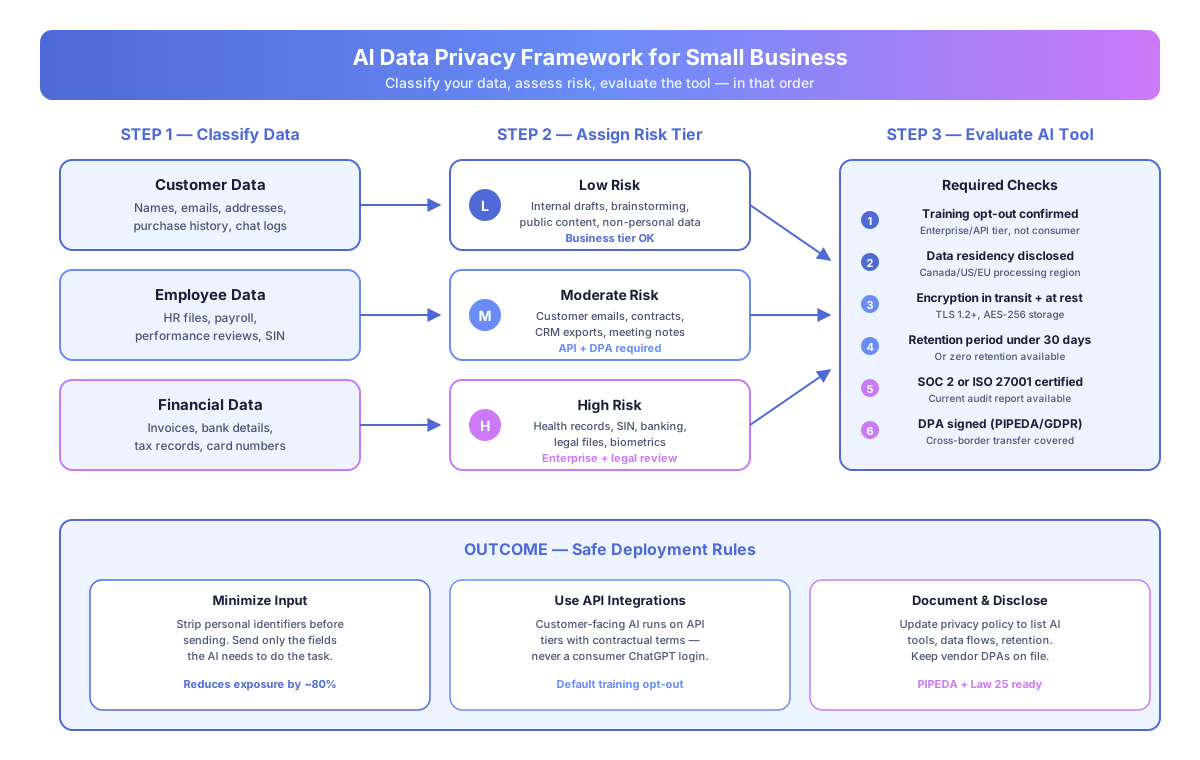
What happens to your data when you send it to an AI tool?
When you type into ChatGPT, Claude, or Gemini, your input travels to the provider’s servers, passes through a model, and returns a response. Three things decide whether that’s safe: training, retention, and data type. Each is a binary choice you control by picking the right account tier.
Does the AI train on your inputs?
Consumer free tiers of ChatGPT, Gemini, and most open chatbots have historically used conversation data to improve their models. Business, Team, Enterprise, and API tiers from the same providers default to training opt-out, with the exclusion written into contract terms.
According to OpenAI’s Enterprise Privacy Commitments page (updated January 2025), “we do not train our models on your business data by default” for API, ChatGPT Team, Enterprise, and Edu customers. Anthropic’s Commercial Terms state the same for Claude Team, Enterprise, and API usage.
The fix is simple: don’t use a personal free account for anything that touches customer records. Upgrade to the business tier or use the API.
How long is your data retained?
Most enterprise AI contracts specify a retention period — typically 30 days — after which conversation logs are deleted. OpenAI’s API offers a zero-data-retention option for eligible customers. Anthropic’s business tier defaults to 30 days with abuse-monitoring deletion rules.
For workflows involving legal, medical, or financial records, confirm the exact retention period in writing before sending data. Vague assurances don’t satisfy auditors.
What type of data are you sending?
A one-paragraph email draft is not the same as a CRM export of 2,000 customers. The chart below is the classification Builts AI uses with clients before any AI deployment.
| Risk tier | Example data | Recommended setup |
|---|---|---|
| Low | Blog draft, internal memo, meeting agenda | Business tier, opt-out on |
| Moderate | Customer email thread, contract summary | API tier, DPA signed, fields minimized |
| High | Health record, SIN, banking info, legal file | Enterprise tier, legal review, PIA done |
Which privacy laws apply to AI use in a Canadian small business?
Canadian businesses processing personal data through AI tools have obligations under PIPEDA federally, plus Quebec’s Law 25 if you serve Quebec residents. Both laws apply regardless of where the AI vendor is based. The trigger is the personal data, not the tool.
What PIPEDA requires for AI deployments
PIPEDA has 10 Fair Information Principles. Four of them show up directly in AI decisions: accountability, identifying purposes, consent, and safeguards. In plain terms:
- Name a legitimate business purpose for feeding personal data into AI
- Tell customers you do this in your privacy policy
- Sign a Data Processing Agreement with the vendor
- Apply technical safeguards — encryption, access controls, retention limits
The Office of the Privacy Commissioner of Canada (OPC) issued updated AI Use Guidelines in September 2025. The OPC flagged failure to update privacy policies after deploying AI as the most common compliance gap they see in small business complaints.
Quebec’s Law 25 raises the bar
Law 25 came fully into force in September 2023 and mirrors GDPR in several areas. If you serve Quebec customers, two extra steps apply. First, a Privacy Impact Assessment (PIA) is mandatory before deploying any new technology that processes personal information. Second, automated decision-making — including AI scoring or recommendations — requires specific disclosure to the affected individual.
Penalties reach CAD 25 million or 4% of worldwide turnover per the CAI (Commission d’accès à l’information), whichever is higher. That’s why a 30-minute legal review before a customer-facing AI rollout is cheap insurance.
What are the four practical rules for safe small business AI use?
Once the data is classified and the law is understood, execution is straightforward. Four rules cover 90% of real small business AI work.
Rule 1: Pick the right tier for the data
Don’t drop customer records into a personal chatbot. Use business tiers with contractual training opt-out for anything beyond low-risk drafting. The monthly cost delta is small — ChatGPT Team runs USD 25 per user per month, Claude Team sits at USD 25 as well, Google Workspace with Gemini Business is USD 24. Enterprise plans scale up from there with SSO, audit logs, and SOC 2 reports.
Stanford’s 2025 AI Index Report found that 78% of organizations now use AI, yet only 44% have formal governance policies. The gap is the risk. Picking the right tier is the cheapest way to close it.
Rule 2: Minimize what you send
Data minimization is the oldest privacy principle and still the most effective. Before you paste, strip the identifiers. Instead of “Summarize John Smith’s email to jane.doe@clientco.com about the January 18 invoice,” send “Summarize this customer email about an invoice dispute.” The AI does the job. Your data exposure drops.
When you’re building workflows in Make or Zapier, configure each step to pass only the fields the AI actually needs — subject line, body text, category — not the full contact record.
Rule 3: Use API integrations for customer-facing AI
Customer-facing AI (support chatbots, voice agents, automated email responders) should never run on a consumer login. Use the vendor API or a purpose-built platform with a contractual DPA. Consumer terms don’t cover business-to-customer workflows, and your insurer won’t accept them if something goes wrong.
For chatbot builds specifically, see our Chatbase review covering how that platform handles training opt-out and data residency. For workflow automation without cloud dependencies, our Make vs n8n comparison walks through self-hosted options.
Rule 4: Document what you’re doing
Three documents cover it. First, a data flow diagram showing which AI tool processes which data type. Second, a vendor list with signed DPAs and current SOC 2 reports. Third, a privacy policy update disclosing the AI use. That’s the paper trail auditors and customers actually want.
How do you evaluate an AI vendor’s data handling?
Six checks settle most vendor reviews. Run them before the contract is signed, not after.
| Check | What to confirm | Where to look |
|---|---|---|
| Training opt-out | Written default for business/API tier | Vendor’s Enterprise Privacy page |
| Data residency | US, EU, or Canada processing region | DPA or data processing addendum |
| Encryption | TLS 1.2+ in transit, AES-256 at rest | Security page or SOC 2 report |
| Retention | Under 30 days or zero-retention option | Data usage policy |
| Certifications | Current SOC 2 Type II or ISO 27001 | Trust center page |
| DPA | Signed agreement covering cross-border | Billing or admin dashboard |
If any of those six is missing or unclear, stop and ask the vendor before deployment. A vendor that can’t produce a current SOC 2 report or a standard DPA is not ready to handle your customer data.
According to Verizon’s 2025 Data Breach Investigations Report, 68% of breaches involved a non-malicious human element — misconfiguration, wrong data sent to the wrong tool, unrevoked access. Vendor checks catch only half of that. The other half is internal process, which Rules 1–4 above handle.
What about AI connected to your CRM, email, and accounting tools?
Connected AI — workflows that plug into HubSpot, Gmail, QuickBooks, or Shopify — needs the same framework applied to each connector, not just the AI provider. Every hop is a processor under PIPEDA, and every processor needs a DPA.
For a two-person services firm, that usually means three DPAs: the AI vendor (OpenAI or Anthropic), the automation platform (Make, Zapier, or n8n), and the source system (the CRM or inbox). All three publish standard DPAs in their billing or admin dashboards. Sign all three before the workflow goes live.
Ask four questions for every integration:
- What fields does this workflow send to the AI provider?
- Can I reduce the fields without breaking the output?
- What’s the retention period on each hop?
- Is training opt-out enabled on every AI step?
If the answer to question 4 is no — or unclear — the workflow doesn’t go into production. The Canadian Federation of Independent Business reported in its 2025 Digital Adoption Survey that 62% of SMBs using AI tools had not reviewed their automation platform’s DPA, even when personal data was in the pipeline. That’s the exact gap this check closes in under an hour.
The balanced view on AI privacy risk
AI data privacy for small businesses is a manageable concern, not a disqualifying one. The same due diligence you already apply to your accounting software or your email provider applies to AI tools. Classify the data, pick the right tier, minimize the inputs, sign the DPA, update the privacy policy. That’s the whole playbook.
Businesses handling regulated data — healthcare, legal, accounting, mortgage, insurance — should add a 30-minute privacy lawyer review before the first customer-facing deployment. That’s CAD 250–500 of professional time that shuts down CAD 25 million of Law 25 exposure. Cheap insurance.
For related reading, see AI Hallucination in Business: What It Is and How to Prevent It and What Are AI Agents? A Plain-English Guide for Business Owners.
Book a free automation audit and we’ll walk through your planned AI use cases, identify the data handling questions specific to your industry, and design the workflow with training opt-out, minimization, and DPAs built in from the start.